Electronic Proof of Delivery with Item-Level Verification
Eliminate disputes with item-level proof of delivery. Capture exactly what was delivered, rejected, or damaged. Use photos, barcode scanning, and customizable ePOD templates.
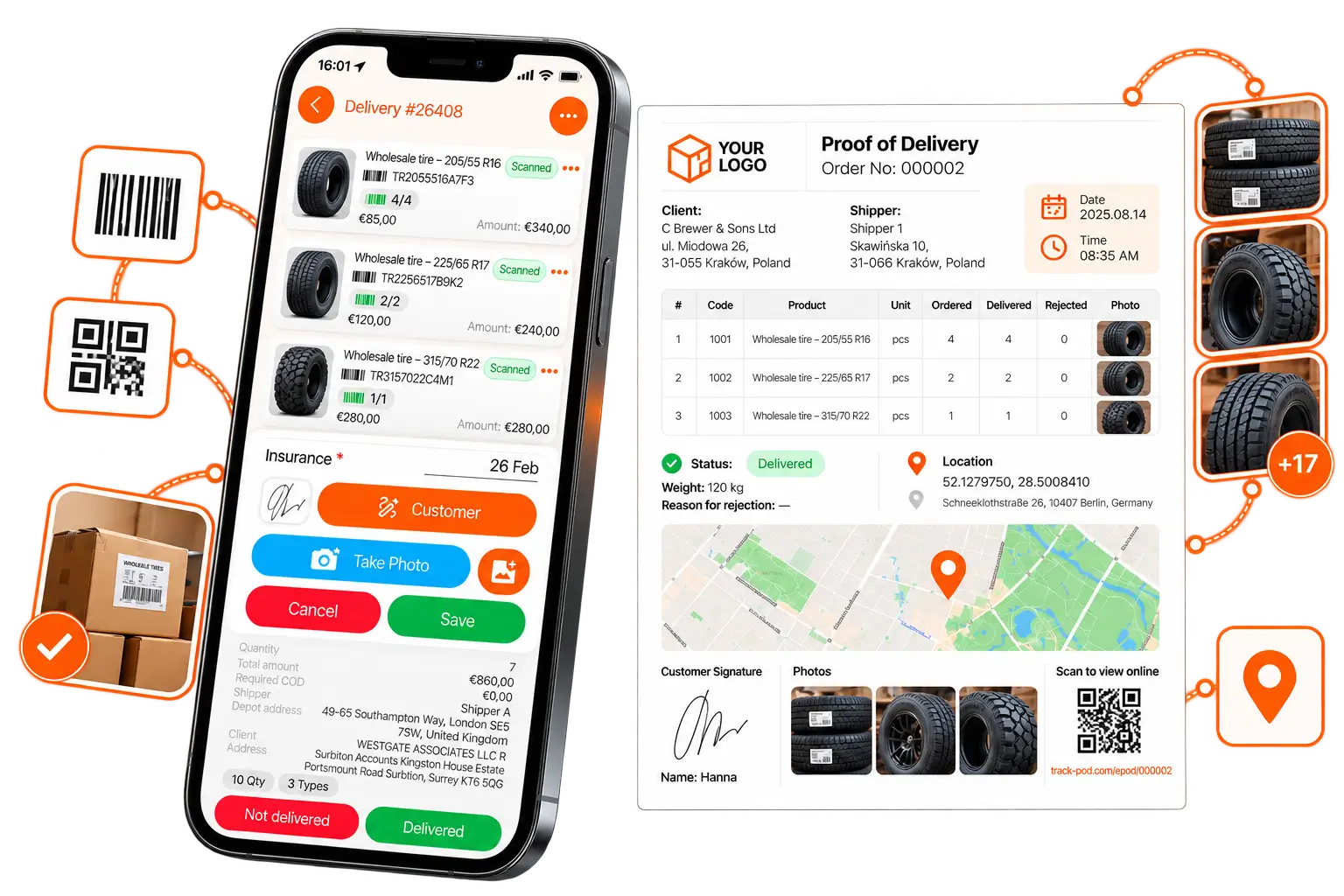
Know exactly where every item landed - even in a complex supply chain
Beyond basic signatures, take up to 20 photos per order, verify items with QR and barcode scanning, or share PIN codes for additional confirmation. Capture every detail and put it on a custom ePOD template with your branding and logo. Track-POD truly eliminates disputes by providing complete visibility for you and your customers.
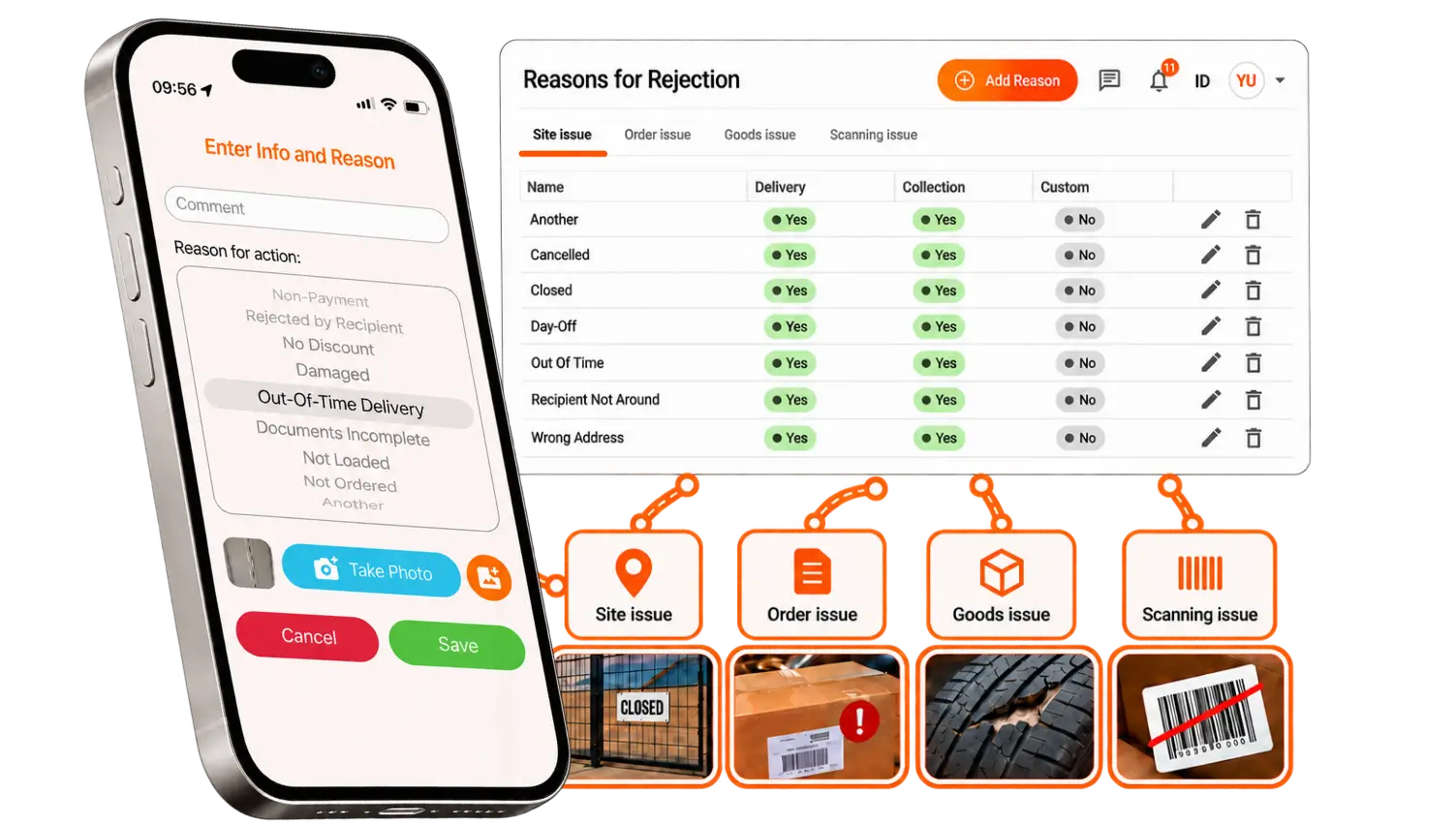
Capture partial deliveries, rejections & item discrepancies
Know exactly what's delivered, rejected, or missing at the item level. Get your back office real-time visibility into delivery discrepancies before they turn into disputes.
-
Actual vs. ordered quantity: Record the exact quantity delivered for each item against the total ordered quantity.
-
Partial and over-deliveries: Capture shortages and over-deliveries that often occur in wholesale logistics.
-
Customizable rejection reasons: Use the default reasons for rejection or set up your own at the level of Site, Order, Goods, or Scanning.
-
Item-level discrepancy evidence: Attach photos and rejection details to support the recorded delivery outcome.
-
Detailed delivery reconciliation: Keep ordered, delivered, and rejected quantities together as a single ePOD record.
Photo proof of delivery with mandatory evidence
Capture up to 20 photos per order and configure photo requirements to ensure your drivers collect the evidence your business needs.
-
Up to 20 photos per order: Document goods, temperature units, damaged items, and other important delivery details.
-
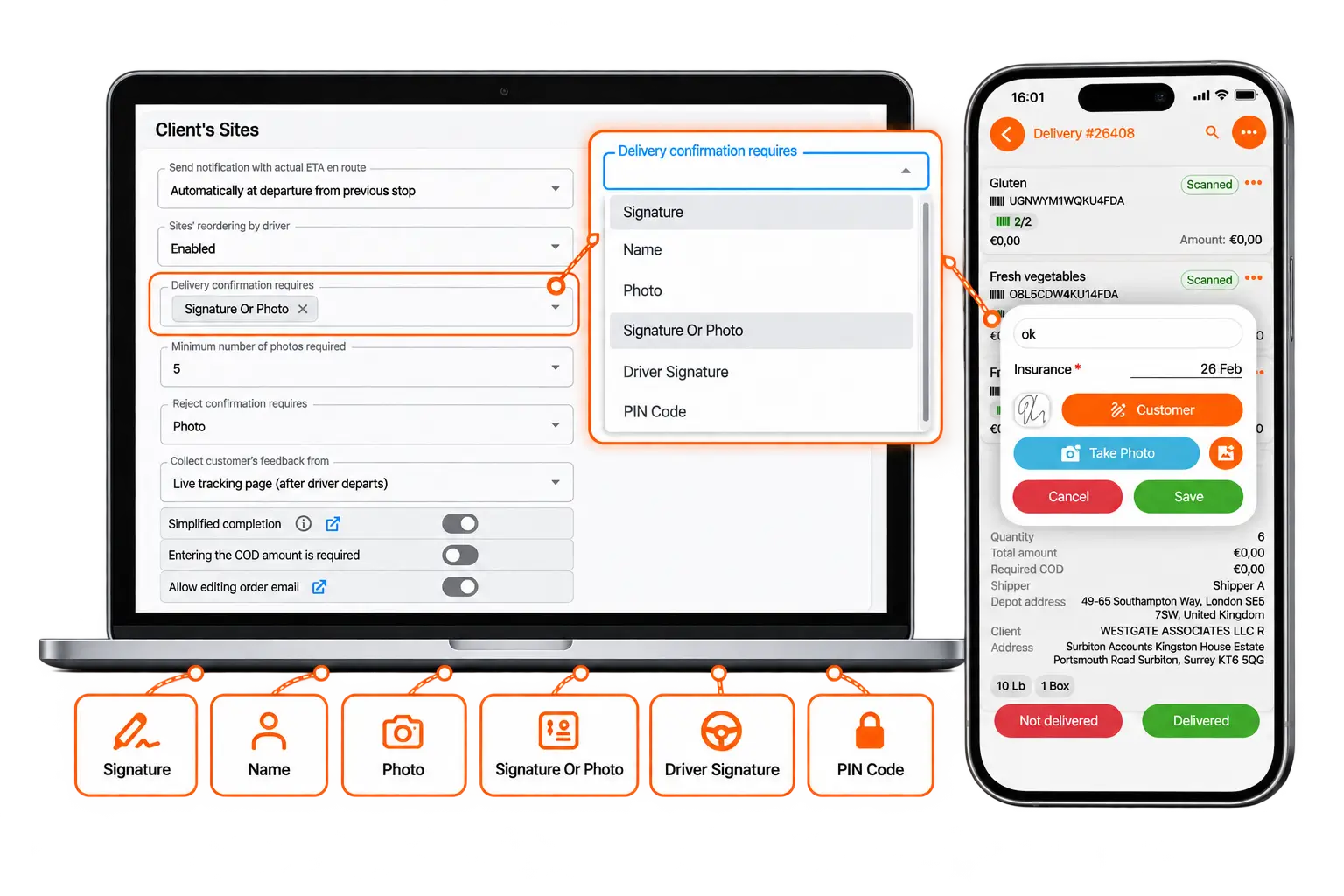
Mandatory photo requirements: Set a minimum number of photos drivers must capture as part of delivery confirmation.
-
Photo evidence for rejections: Require photo proof when deliveries are rejected to reduce unsupported claims.
-
Signature or photo confirmation: Allow Name, Signature, or PIN code in cases where photo confirmation is unavailable.
-
Control photo sources: Restrict uploads from gallery if you want drivers to capture evidence at the delivery/collection site only.
QR & barcode scanning for item verification
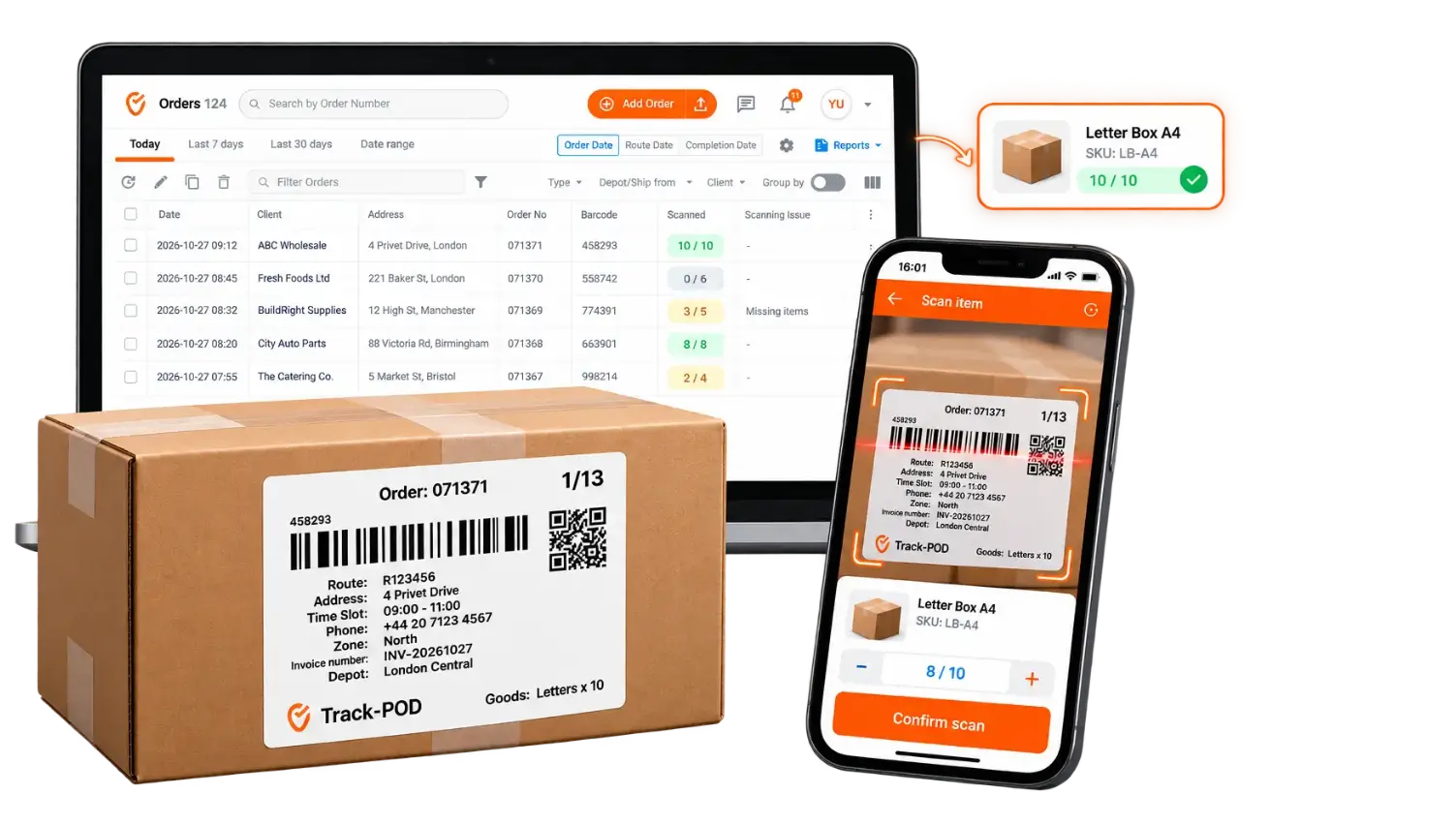
Scan-based verification for items helps drivers identify and confirm goods on the spot, reducing manual error and incomplete shipments.
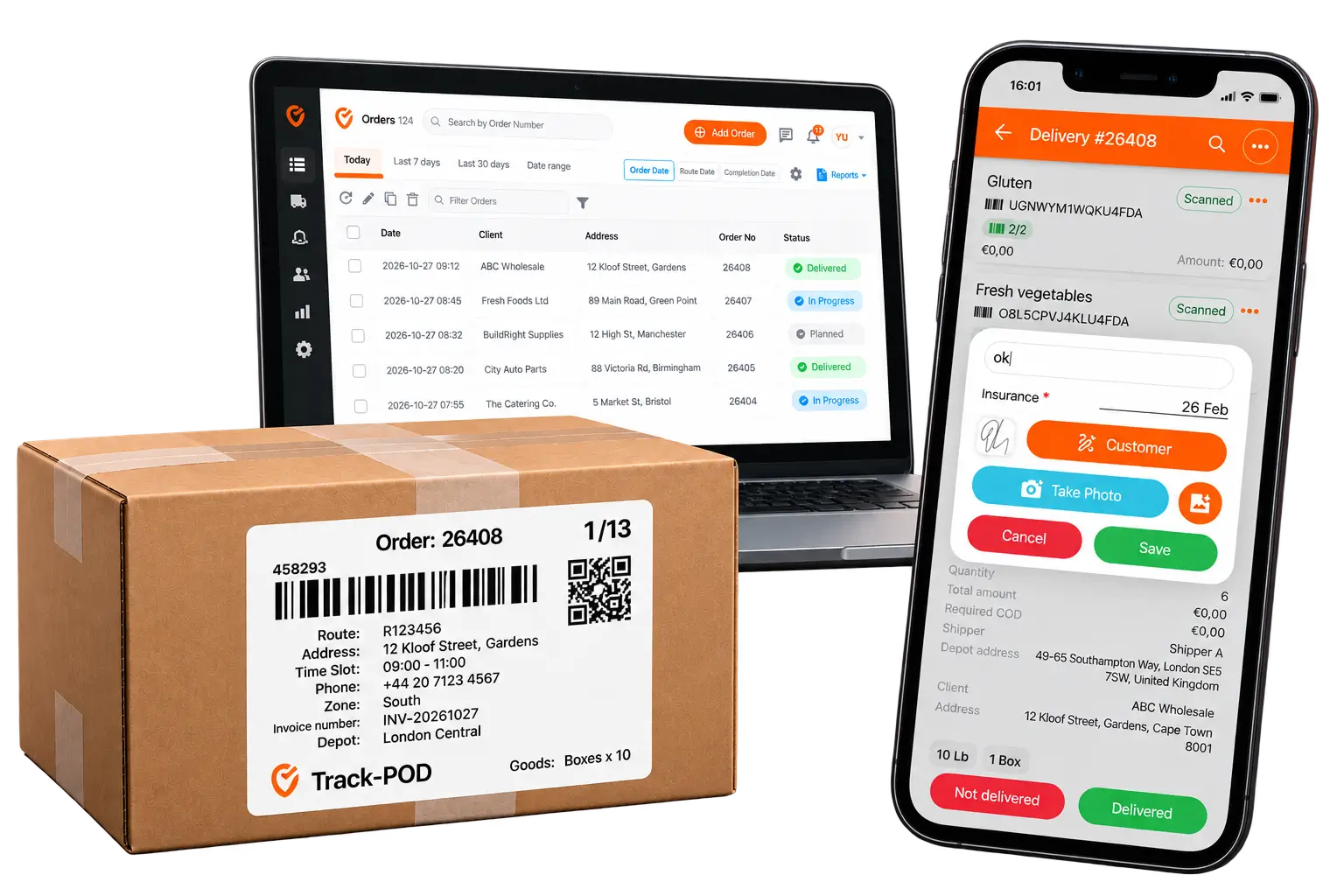
- Shipping label scanning: Generate barcodes inside Track-POD’s shipping labels and have your drivers scan each item or the entire order at once.
- Scan & Count: Enable Scanning & Counting so that scanned items are counted by the system automatically.
- Quantity verification: Track scanned quantities against expected quantities to identify missing or mismatched items.
- Faster multi-item deliveries: Streamline verification for wholesale shipments containing multiple product types and quantities.
Custom ePOD template with HTML editing
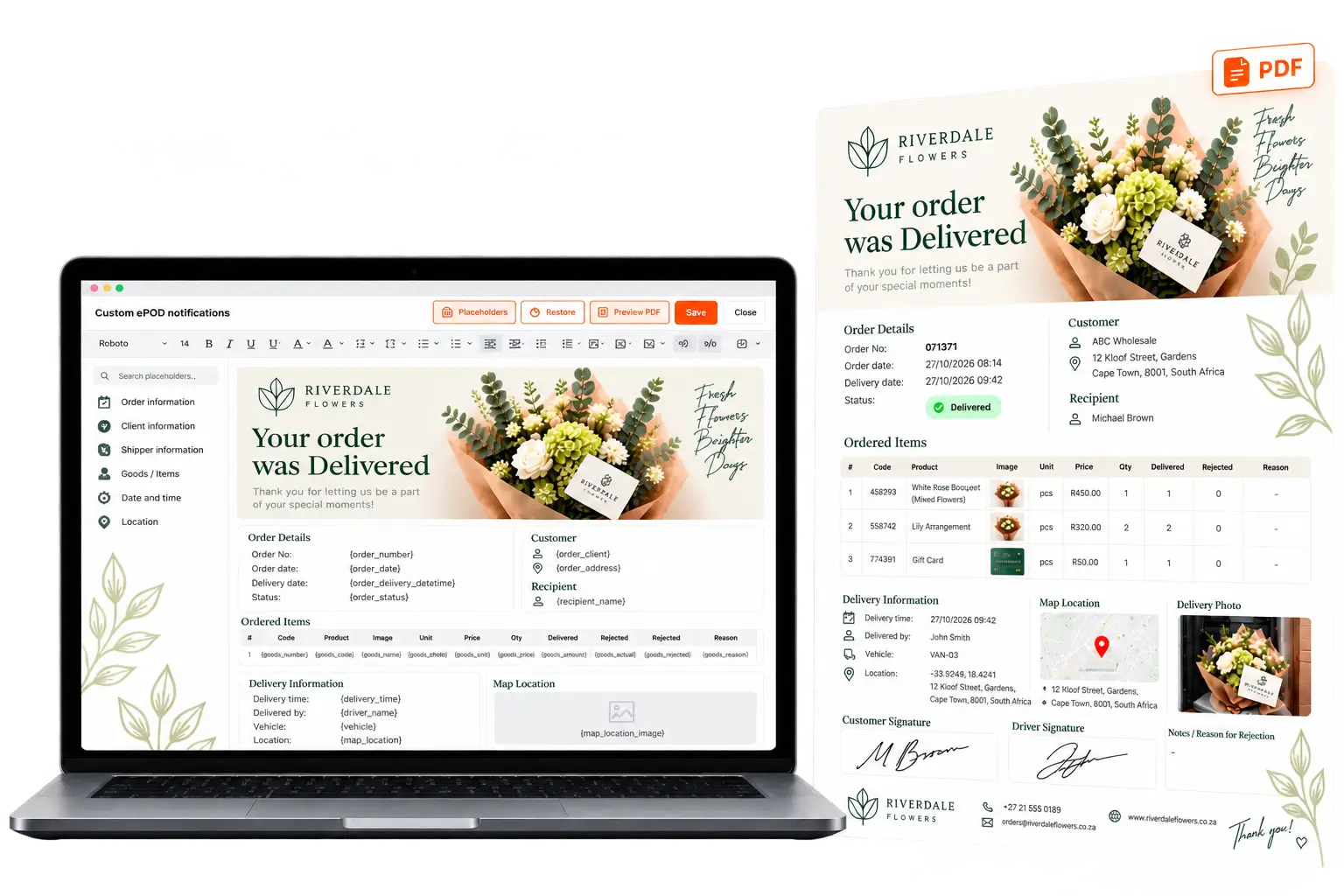
Create professional ePOD documents using Track-POD's built-in editor. Customize the default PDF layout, add your branding, and insert dynamic delivery data - or switch to HTML editing to create truly unique document design.
- Built-in HTML editor: Customize the layout, formatting, tables, and design using a visual editor or HTML source.
- Dynamic data placeholders: Automatically populate ePODs with delivered vs rejected quantities, rejection reasons, and other delivery information.
- Custom branding: Add your company logo and tailor the document to your business branding.
- Location evidence: Include timestamps, GPS coordinates, and other available proof of delivery details.
- Instant PDF preview: Review your customized ePOD PDF before saving the template.
Verification with GPS, timestamps & PIN
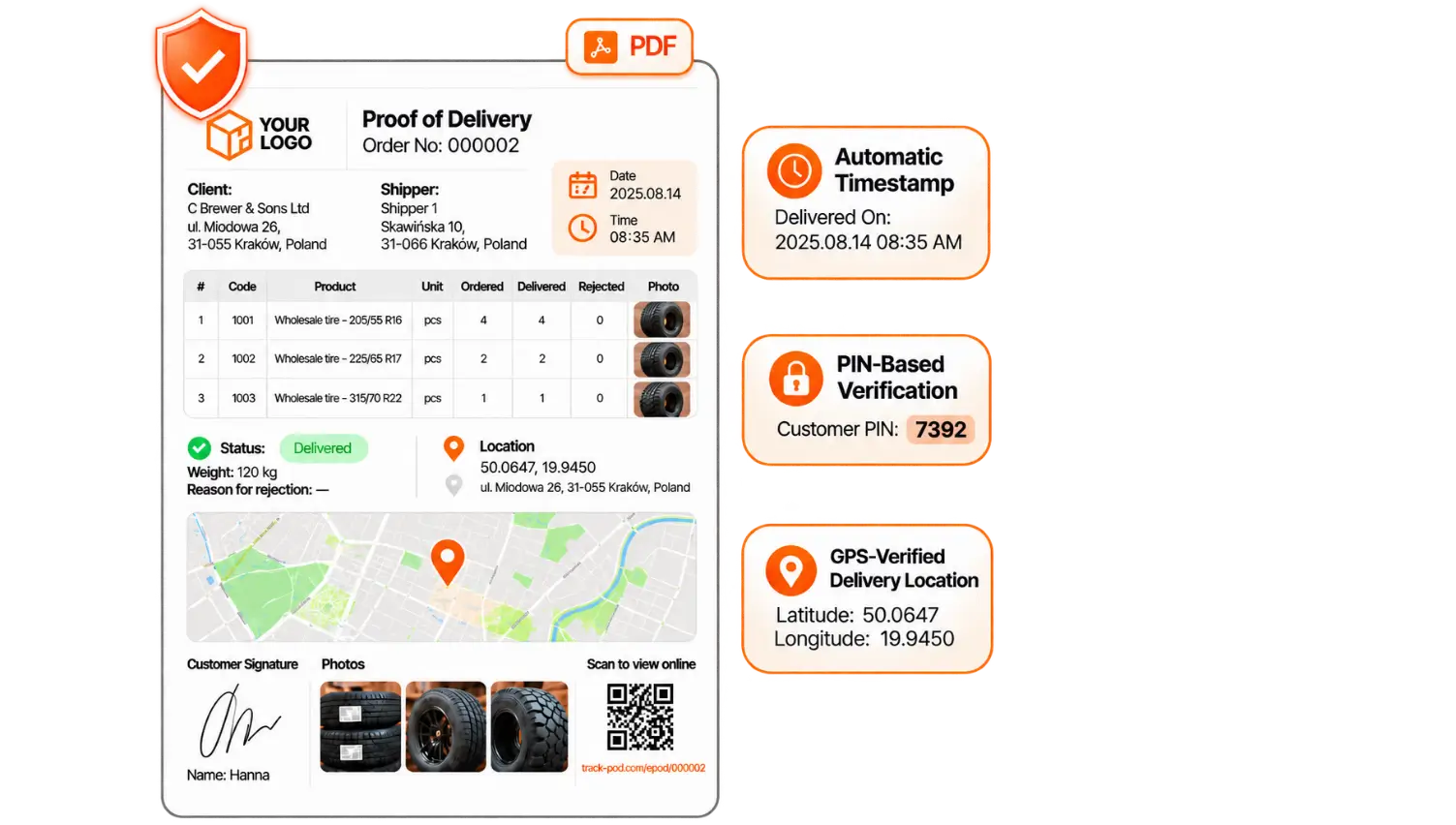
Track-POD combines GPS coordinates, automatic timestamps, and PIN-based recipient confirmation to strengthen ePOD accountability and help resolve disputes.
- GPS-verified delivery location: Capture the coordinates and display the precise location on a map within the ePOD document.
- Automatic timestamps: Record the exact date and time of delivery confirmation for a reliable audit trail.
- PIN-based verification: Require a customer-provided PIN to add an extra layer of security for sensitive shipments.
- Multi-layer or simplified workflow: Switch to the simplified ePOD workflow if you want your drivers to be able to complete a delivery in one click.
How businesses benefit from electronic proof of delivery

Creating Unique Customer Experience with ePOD: Petal&Post
“Having a unique ePOD design helps us keep customers involved. It also vastly decreases the amount of emails and calls about order status.”
Reducing Expenses with Proof of Delivery: SCIENTIA
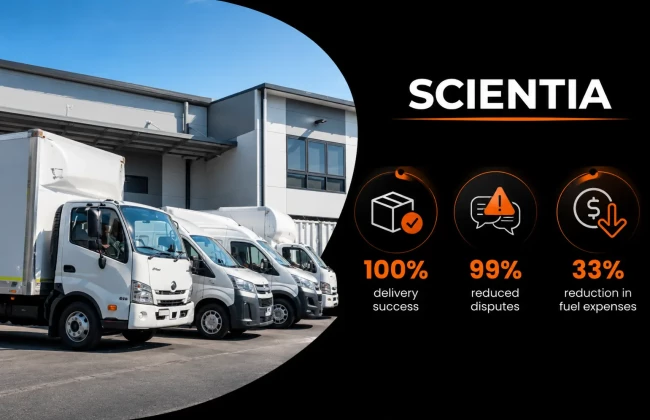
Learn now Australia-based SCIENTIA successfully reduced costly disputes by 99% thanks to Track-POD's electronic proof of delivery workflow.

Securing Proof of Collection & Delivery for Doctors: Advanced Dental Arts
“When doctors say we didn’t deliver the package, we can send them the picture to prove that we have. It adds a little bit of time but it’s well worth it.”
You're in good company


What our clients are saying

Track-POD is an easy-flowing system that’s not difficult for drivers. It dropped us from an average of 24 minutes per delivery down to 17 minutes per delivery, which is a huge saving when you have 100+ drivers. The difference between then and now is that we have the flexibility to adjust on the fly.
Rob BarrImperial Dade Senior Transportation Manager

Track-POD is one of the only all-in-one software options with good auto route planning, e-signatures, and live tracking. Versatility, ease of use for new staff, adaptable to our system. Drivers picked up the use quickly, even older, less tech-savvy team. The geolocations and photos/signatures are excellent PODs.
Ian NolanDepot Operations Manager at GAP Ltd

Because Track-POD is so easy to use, as the driver drives with it, they get extremely consistent and fast. I love that with Track-POD there is a way to make it very easy and just say: we have this many vehicles – go for it and create our routes.
Stephanie ChuppDirector of Sustainability at Prep to Your Door

Customers know exactly when they’re getting their deliveries and they’re able to track the vans’ progress through Track-POD – this has been a massive asset in building trust. No one struggled with Track-POD for more than a few days – it’s really easy to use for everyone.
Catherine PowellDespatch Coordinator at TyreLine Distributors Limited

Track-POD has an easy, clear, intuitive interface, the ability to integrate and import data, map-focused route planning, and a licencing model I could manage and live with. Not only has the product never broken on us, working with the Track-POD team has proved to be a good working relationship.
Robert CampbellCo-Founder at ZMOVE
Try electronic proof of delivery for free
Get our risk-free trial - no credit card required. Test drive Track-POD's web dashboard and the mobile app together for an integrated proof of delivery workflow.
Capture item-level photographic evidence of successful delivery or rejection, generate custom shipping labels, and even design your own proof of delivery PDF using our HTML editor.
10,000+ businesses globally use Track-POD to prevent disputes by capturing detailed, reliable electronic proof of delivery. Join them and see the impact our ePOD solutions can make.
Frequently Asked Questions
Yes. Track-POD's mobile app allows drivers to record actual delivered quantities for individual items, including goods that were partially delivered or rejected. This provides an accurate record of what the customer received without treating the entire order as unsuccessful.
Yes, Track-POD offers custom object creation, including reasons for rejection. There are 4 types of reasons for rejection you can work with in Track-POD: Site issue, Order issue, Goods issue, and Scanning issue. You can also mark if your new custom reason should apply to deliveries or collections - or both.
Track-POD allows up to 10 photos per order with Advanced, Advanced+, Core, and Growth plans. Any plans above that allow up to 20 photos. You can also configure the minimum number of photos your drivers need to take per order. Or restrict uploads from gallery to encourage drivers to capture evidence directly.
Yes. With Scan & Count enabled, Track-POD's mobile app scanner automatically counts items, helping drivers verify quantities against the order. This is particularly useful for multi-item wholesale and distribution deliveries.
Yes. Track-POD supports location-related placeholders, including latitude, longitude, and a map image. These can be added to a custom ePOD template alongside delivery timestamps and other confirmation details.
Yes. Track-POD offers a simplified ePOD workflow that allows drivers to confirm deliveries in one click. You can enable this option when a streamlined confirmation process is more efficient than collecting additional evidence.